This tutorial explains how to read RTSP streams using OpenCV, installed via VCPKG, and includes examples in both C++ and Python. Capturing an RTSP video stream is a common requirement for applications such as surveillance, live broadcasting, or real-time video processing. Additionally, we will explore basics of RTSP-RTP protocol.
- The article is not written by AI.
- The intro image is generated by AI.
- Grammar correction was done by ChatGPT
The example will include stream from FFMPEG to RTSP server and receive in Opencv C++ and Python programs. Debug and trace RTSP, RTP communication by wireshark. It would be great to mention and share my work. Thanks
What is RTSP?
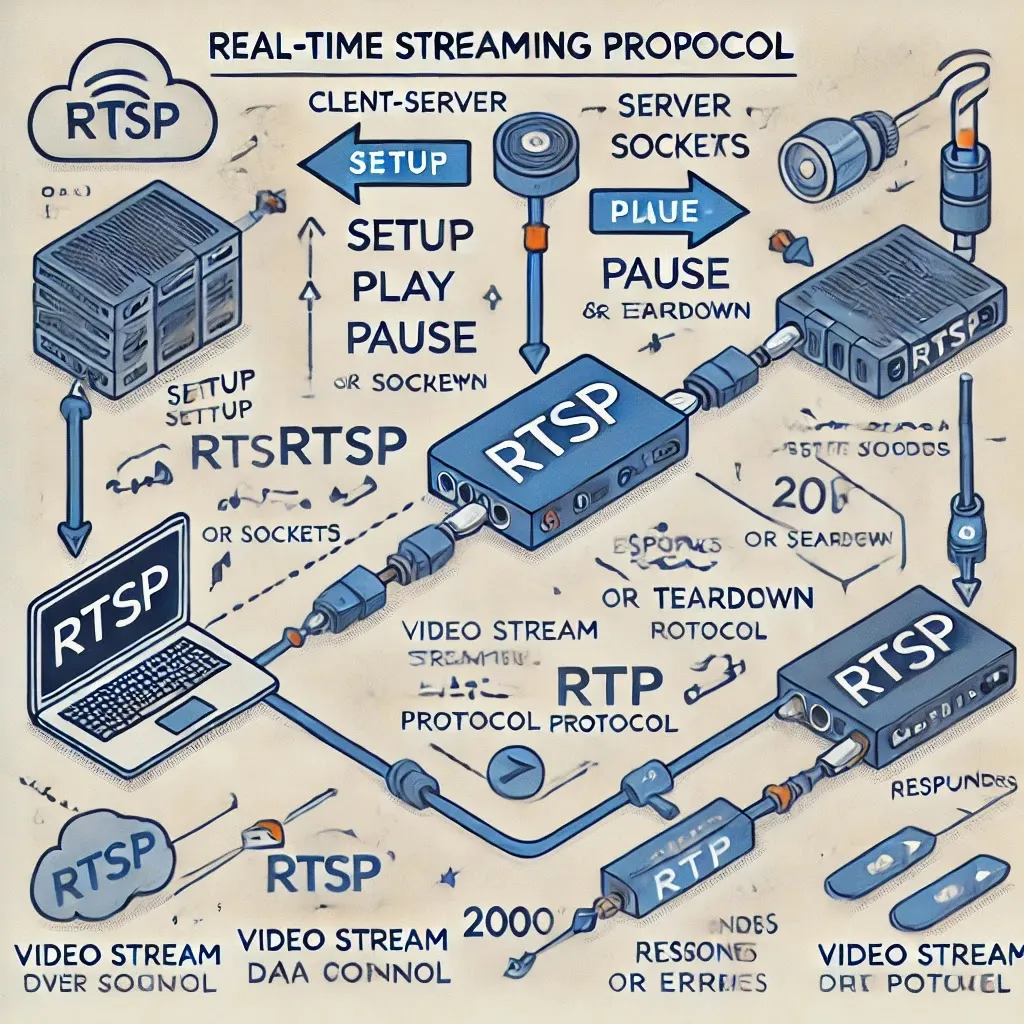
RTSP (Real-Time Streaming Protocol) is a network control protocol designed for use in entertainment and communication systems to control streaming media servers. In this tutorial, the main focus is on video capture in Opencv from RTSP video stream.
RTSP video transfer itself consists of a control protocol. Method: e.g., SETUP, PLAY, PAUSE, or TEARDOWN. The video data transfer through RTP packets (Data layer) with various codec formats.
- H.264: Widely used for high-quality streaming.
- MJPEG: Motion JPEG for simpler, frame-by-frame delivery.
- H.265: HEVC for high efficiency.
RTSP URLs typically include user credentials, server IP or hostname, and a camera stream path or parameters.
**Example RTSP URL: **An RTSP URL format is usually as follows:
rtsp://[username:password@]host[:port]/path
- username:password: Optional for authentication.
- host: Server address.
- port: Optional (default is 554).
- path: Media resource location.
Like
rtsp://ADMIN:Admin@192.168.1.10/axis-media/media.amp?camera=2And, The part after IP address usually depends on camera vendor or media server.
What to expect on the socket
The rtsp is driven by client to server by sending request what action with media should be performed. For example command play on the following lines. Play, URL, Cseq is number of sequins and other attributes and session id.
PLAY rtsp://example.com/video RTSP/1.0
CSeq: 2
Session: 12345678
RTSP/1.0 200 OK
CSeq: 2
Session: 12345678
The OK response is usually of following format, when request can be satisfied. The RTSP is usually followed by RTP transfer of video or audio data itself. The format can be parsed bitwise, where first 2 bits represent version, 1 bit for padding, 1bit for header extension, etc. So once RTP is received on socket it bitwise mapped and use by receiver to determine some important parts of the media. The important RTP header are 7 bits of payload type, such as H.264,ACC codec. So the reviver is able to apply correct decoder for codec. There is also 16 bits of sequence number and 32 bits timestamp. And of course there is RTP payload of the transferred media. You can also read more on the standards here:- https://datatracker.ietf.org/doc/html/rfc3551
Recap, RTSP controls what will happen. The RTP will serve video information about codecs etc and the
media data.
Setup of video streaming experiment
The goal is to use ffmpeg to stream to rtsp server and than capture in Opencv. The setup is simple. I will use rtps simple server in this example. There is yml config and executable module. I will use default config that will open some port on local host to accept connection and restream.
-a---- 18195456 rtsp-simple-server.exe
-a---- 9811 rtsp-simple-server.yml
PS C:\rtmServer> .\rtsp-simple-server.exe
2024/12/30 12:11:50 I [0/0] rtsp-simple-server v0.17.3
2024/12/30 12:11:50 I [0/0] [RTSP] UDP/RTP listener opened on :8000
2024/12/30 12:11:50 I [0/0] [RTSP] UDP/RTCP listener opened on :8001
2024/12/30 12:11:50 I [0/0] [RTSP] TCP listener opened on :8554
2024/12/30 12:11:50 I [0/0] [RTMP] listener opened on :1935
2024/12/30 12:11:50 I [0/0] [HLS] listener opened on :8888
We can see listening service on UDP TCP for RTSP, there is also RTMP and HLS. I will try to send video to 8554 port over local host. Let start wireshark to see what is going on over the network. Wireshark is set up to catch packets on concrete ports.
Now use ffmpeg to send video to rtsp server:
./ffmpeg.exe -re -i C:\www\town0.avi -c:v libx264 -preset veryfast
 -tune zerolatency -pix_fmt yuv420p -g 30 -r 30 -b:v 1000k -maxrate 1000k
 -bufsize 2000k -f rtsp -rtsp_transport tcp -listen 1 rtsp://localhost:8554/live/stream
The log will display something as follows.
  PS C:\ffmpeg\bin> ./ffmpeg.exe -re -i C:\www\town0.avi -c:v libx264 -preset veryfast
 -tune zerolatency -pix_fmt yuv420p -g 30 -r 30 -b:v 1000k -maxrate 1000k -bufsize 2000k
 -f rtsp -rtsp_transport tcp -listen 1 rtsp://localhost:8554/live/stream
 built with gcc 9.3.1 (GCC) 20200621 configuration: --enable-gpl ....  libavutil
  libavcodec     58. 91.100 / 58. 91.100
  libavformat    58. 45.100 / 58. 45.100
  libavdevice    58. 10.100 / 58. 10.100
  libavfilter     7. 85.100 /  7. 85.100
  libswscale      5.  7.100 /  5.  7.100
  libswresample   3.  7.100 /  3.  7.100
  libpostproc    55.  7.100 / 55.  7.100
Input #0, avi, from 'C:\www\town0.avi':
  Duration: 00:05:00.00, start: 0.000000, bitrate: 3932 kb/s
    Stream #0:0: Video: mpeg4 (Advanced Simple Profile) (XVID / 0x44495658),
 yuv420p, 1920x1080 [SAR 1:1 DAR 16:9], 3928 kb/s, 25 fps, 25 tbr, 25 tbn, 25 tbc
Stream mapping:
  Stream #0:0 -> #0:0 (mpeg4 (native) -> h264 (libx264))
Press [q] to stop, [?] for help
[libx264 @ 0000021b6a6faf00] using SAR=1/177014:32:22.77 bitrate=N/A speed=N/A
[libx264 @ 0000021b6a6faf00] using cpu capabilities: MMX2 SSE2Fast SSSE3 SSE4.2
[libx264 @ 0000021b6a6faf00] profile High, level 4.0, 4:2:0, 8-bit

Output #0, rtsp, to 'rtsp://localhost:8554/live/stream':
  Metadata:
    encoder         : Lavf58.45.100
    Stream #0:0: Video: h264 (libx264), yuv420p, 1920x1080 [SAR 1:1 DAR 16:9],
    Metadata:
      encoder         : Lavc58.91.100 libx264
    Side data:
      cpb: bitrate max/min/avg: 0/0/0 buffer size: 0 vbv_delay: N/A
frame=  446 fps= 24 q=22.0 size=N/A time=00:00:17.88 bitrate=N/A dup=1 drop=0 speed=0.973x
2024/12/30 12:21:51 I [1/0] [RTSP] [session 164751246] is publishing to path 'live/stream'
Once the ffmpeg will correctly connect to server you will see this message
Wireshark trace for port 8554 RTSP
RTSP Request: OPTIONS rtsp://localhost:8554/live/stream RTSP/1.0\r\n CSeq: 1\r\n
RTSP Response: RTSP/1.0 200 OK\r\n
RTSP Request: ANNOUNCE rtsp://localhost:8554/live/stream RTSP/1.0\r\n
         Content-length: 280
RTSP Response: RTSP/1.0 200 OK\r\n
RTSP Request: SETUP rtsp://localhost:8554/live/stream/streamid=0 RTSP/1.0\r\n
         Transport: RTP/AVP/TCP;unicast;interleaved=0-1;mode=record
         CSeq: 3\r\n
RTSP Response: RTSP/1.0 200 OK\r\n
RTSP Request: RECORD rtsp://localhost:8554/live/stream RTSP/1.0\r\n
RTSP Response: RTSP/1.0 200 OK\r\n
RTSP ends
RTP video dataReal-Time Transport Protocol first packet
Then RTP packet with video data of lenght 1540 bytes.Example: Capturing RTSP Streams
Once FFMPEG and server is working correctly. Server publish URL with video and you are ready to receive video in Opencv C++ or Python program.
Prerequisites: OpenCV and FFMPEG Libraries
To start, you’ll need to install OpenCV C++ with FFMPEG. I recommend using the VCPKG installation method described in the following links:
In Python use Pip package manager as always.
Openv RTSP capture Using C++
#include <opencv2/opencv.hpp>
#include <iostream>

using namespace cv;
using namespace std;

int main() {
    // Replace with your RTSP stream URL
    VideoCapture capture("rtsp://localhost:8554/live/stream",cv::CAP_FFMPEG);

    if (!capture.isOpened()) {
        cout << "Error: Cannot open the RTSP stream." << endl;
        return -1;
    }

    Mat frame;

    while (true) {
        // Grab a frame
        bool isFrameGrabbed = capture.grab();
        if (!isFrameGrabbed) {
            cout << "Error: Cannot grab frame from RTSP stream." << endl;
            break;
        }

        // Retrieve and process the frame
        capture.retrieve(frame);

        // Display the frame
        imshow("RTSP Stream", frame);

        // Exit the loop on pressing 'q'
        if (waitKey(30) == 'q') {
            break;
        }
    }

    capture.release();
    destroyAllWindows();

    return 0;
}
Openv RTSP capture Using Python
import cv2

# Replace with your RTSP stream URL
rtsp_url = "rtsp://USER:PASS@xxx.xxx.xxx.xxx/axis-media/media.amp?camera=2"

# Open the RTSP stream
capture = cv2.VideoCapture(rtsp_url)

if not capture.isOpened():
    print("Error: Cannot open the RTSP stream.")
    exit()

while True:
    # Read a frame
    ret, frame = capture.read()
    if not ret:
        print("Error: Cannot grab frame from RTSP stream.")
        break

    # Display the frame
    cv2.imshow("RTSP Stream", frame)

    # Exit the loop on pressing 'q'
    if cv2.waitKey(30) & 0xFF == ord('q'):
        break

capture.release()
cv2.destroyAllWindows()
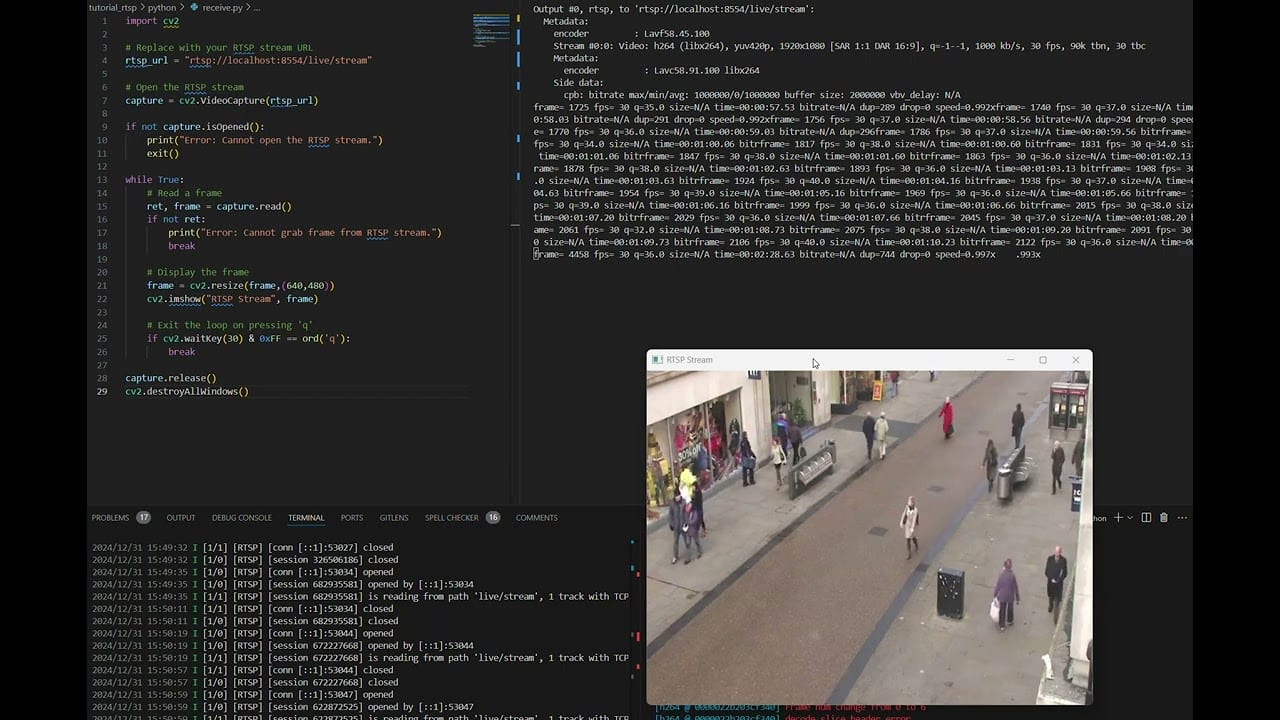
Python program execution
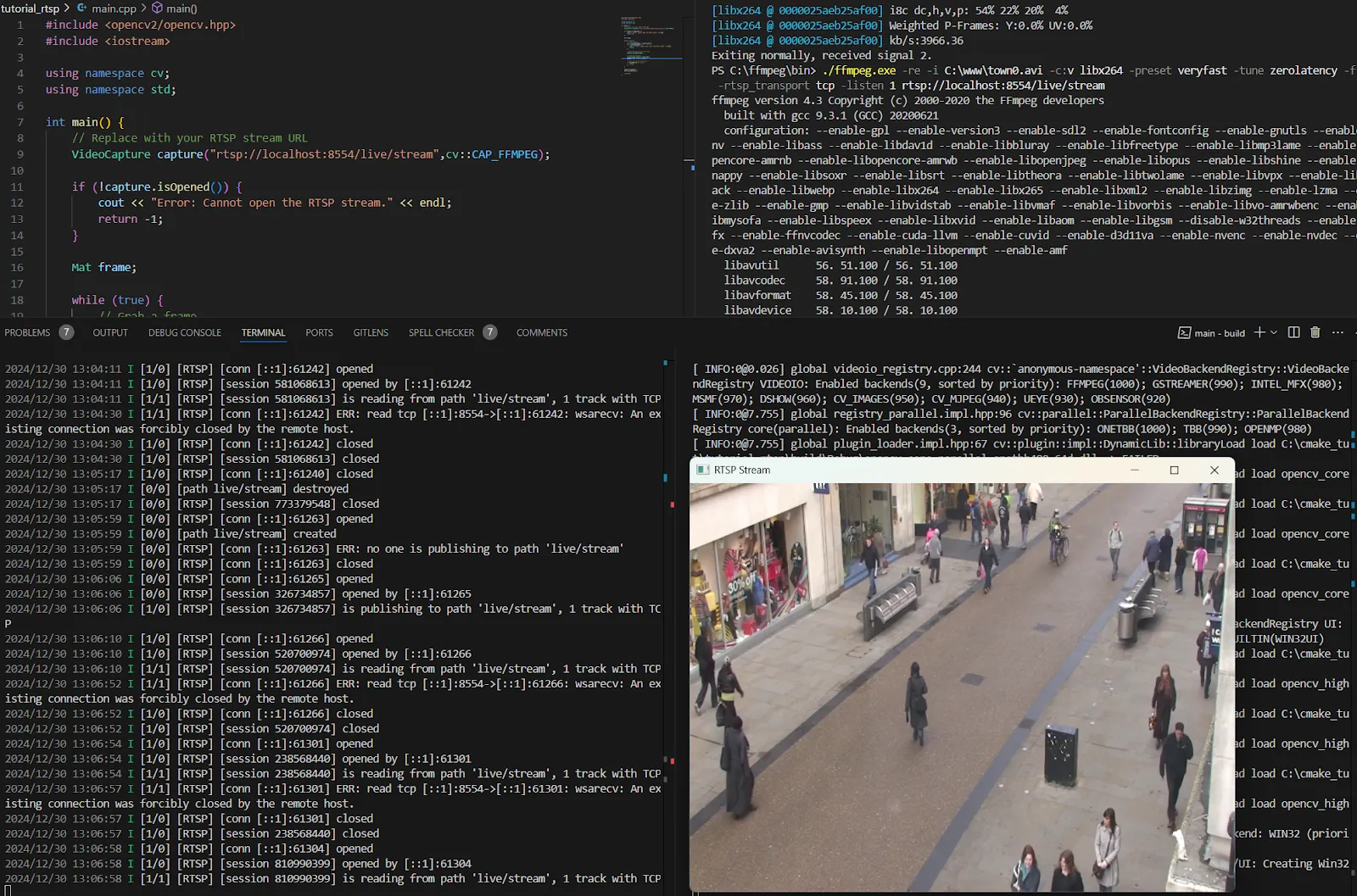
The upper right window is ffmpeg sending data to opencv program running in consol lower right. The server through the connection is done running in lower left and source code is. You know where the source code is. :)
Conclusion
This tutorial covers capturing RTSP video streams using OpenCV in both C++ and Python. By understanding RTSP basics and using Opencv to process video stream, you can build powerful video processing applications. Stay tuned for future posts diving deeper into RTSP stream formats and advanced features soon!